


Baby journal
0.00.00 Reviews
App Specs
- Version
- 3.0.1
- Updated On
- License
- Free
- Downloads
- 50,000+
- Developer
- Schaban Bochi
- Categories
- Parenting
- Platform
- Android
Screenshots

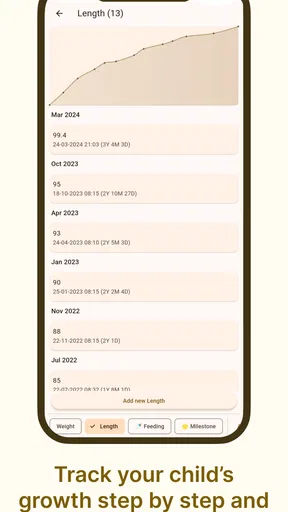
 Analysis by AppCompare
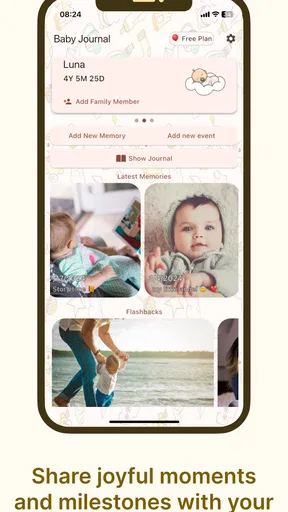
When a baby is growing quickly, the moments worth remembering arrive in the middle of ordinary life: a first smile during breakfast, a funny new sound, a sleepy photograph, or a sentence that seems small today but will feel precious later. I tried Baby journal as a simple place to collect those memories instead of leaving them scattered through my camera roll and chat conversations. It is a free parenting app from Schaban Bochi, and its purpose is easy to understand: keep a personal record of a child’s early moments in one dedicated space.
That simplicity is the main reason I can imagine recommending it. This is not a general family organizer, a medical tracker, or a social network. It is a private-feeling memory journal built around the emotional side of parenting. The app is listed for Everyone, runs on Android 7.0 and later, and has reached over 50 thousand installs. Its current version is 3.0.1, so it is also a practical option for families using older Android phones rather than only the newest devices.
From a fleeting moment to a memory you can revisit
The most useful way to understand Baby journal is to follow the complete journey of a memory. The starting condition is usually familiar: I take a photo, notice something amusing, and tell myself I will write it down later. Later often becomes tomorrow, and tomorrow becomes a vague recollection. A dedicated baby journal changes that habit by giving the moment a clear destination as soon as it happens.
My preferred workflow begins with a small decision: record only moments that I would genuinely want to remember. That keeps the journal from becoming another task list. A parent does not need to document every feeding, nap, or diaper change here. Instead, the app works best for stories, milestones, expressions, family memories, and the tiny details that photographs alone cannot explain.
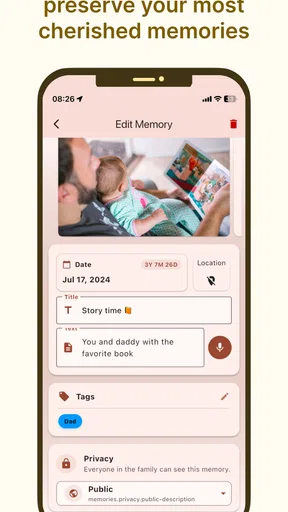
For example, imagine a Saturday afternoon when a baby tries to clap for the first time. I would capture the image, add a short note describing what happened, and include the date or context in a way that will make sense months later. The useful detail is not merely “clapping.” It might be “started clapping whenever the dog walked into the room.” That extra sentence turns a picture into a memory with a story attached.
The strongest habit is to write while the event is still fresh. A short, specific note is more valuable than a long entry written after the details have faded. I found that treating the app as a quick journal rather than a formal scrapbook makes it much easier to keep using. The goal is not perfect wording; the goal is preserving the detail that future me would otherwise lose.
A practical entry routine for busy parents
In everyday use, I would divide entries into three simple types. The first is a milestone, such as a new movement or expression. The second is a story, such as an unexpected reaction or family interaction. The third is a quiet detail, such as a favorite blanket, a particular laugh, or the way a child reaches for a familiar person. This approach prevents the journal from being dominated by only major events.
Worth Reading Before You Choose

EA SPORTS FC Mobile 26 Is a Bigger Football Game, but It Takes Time

Flipboard Shows What News Apps Must Do Beyond the Feed

Switching to Android Auto Means Rethinking Your Driving Routine

Google Calendar Makes a Crowded Week Easier to Manage

Ludo King Makes the Most of the Minutes Between Plans

Baby Panda World Brings Quick Play to Modern Phones, but Its Game Library Feels Busy
That distinction also helps when several adults care for the same child. A parent might record a morning moment, while a grandparent later adds a different observation. The handoff is not just about passing along a photo; it is about preserving context. If someone else is helping maintain the journal, agreeing on a simple style—short notes, clear dates, and one memory per entry—keeps the collection readable.
I would also avoid waiting for a “perfect” photograph. A slightly imperfect image paired with a meaningful sentence can be more valuable than a polished picture with no explanation. This is one of the app’s natural strengths as a baby memory journal: it encourages the written and visual parts of a memory to sit together rather than forcing the photo to carry the entire story.
There is a useful trade-off here. A dedicated journal feels more intentional than the phone gallery, but it asks me to perform one extra action. Saving a picture to the camera roll happens automatically; creating a journal entry requires attention. Parents who already struggle to keep up with daily routines may find that friction significant. My suggestion is to use it for selected memories, not every event, and to make entries immediately after taking the picture whenever possible.
What happens when a memory needs to be shared
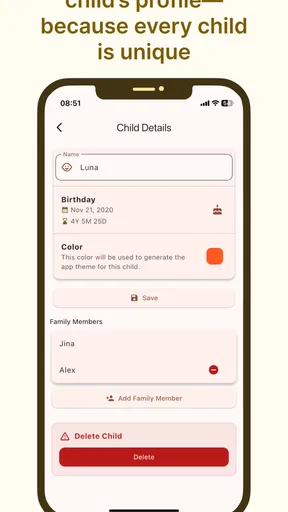
The next stage is the handoff from the person who witnessed the moment to the people who were not there. Baby journal is especially appealing when one parent is working, a relative lives elsewhere, or several family members want a shared record of childhood. The value is not only in storing the memory; it is in making the memory easier to pass on.
I would use that sharing step selectively. A family may want to show a new expression or a funny story, but not every private detail belongs in a wide conversation. Before sharing, I would check the image, remove anything in the background that should remain private, and reread the note as if a grandparent were seeing it without any surrounding context. A journal entry that makes perfect sense to the person who wrote it can be confusing to everyone else.
Another practical workflow is to make one person the regular recorder and let other family members contribute ideas through ordinary conversation. The recorder can then turn those suggestions into consistent entries. This avoids a common problem with shared memory projects: several people add fragments in different styles, and the final collection becomes difficult to follow.
For families who mainly want instant group updates, a messaging app may still be better. Messages are faster for “look what happened just now,” and relatives are more likely to see them immediately. Baby journal is better when the aim is a lasting collection that can be revisited later. That difference matters: instant communication and long-term memory are related, but they are not the same job.
The app’s free entry point makes it easy to try without committing money first. At the same time, in-app purchases range from $0.99 to $48.99 per item, so I would pay attention to any optional purchase screen and decide in advance whether the journal is worth expanding beyond its free use. The right choice depends on how central the app becomes to a family’s memory routine, not on the emotional pressure of a particularly meaningful moment.
Turning separate entries into a personal record
The result of a good workflow is not a perfectly complete history of a baby’s life. It is a collection of moments with enough context to bring them back. That distinction is important because parents often abandon memory projects when they feel they have missed too much. Baby journal works better when I accept that an uneven record can still be deeply meaningful.
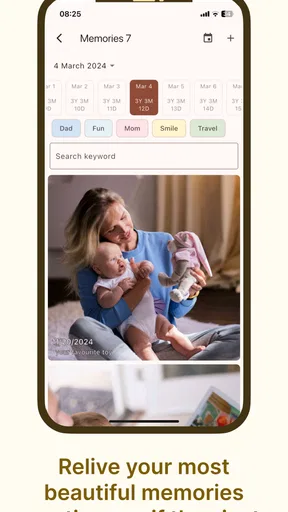
After several entries, the journal can become a useful prompt for reflection. A parent may notice how a child’s expressions changed, which people appeared repeatedly in the stories, or how ordinary routines became memorable. Those patterns are hard to see when images are spread across a gallery, cloud folder, and multiple message threads.
I also like the idea of using the journal during family visits. Instead of scrolling randomly through thousands of photographs, I can open selected memories and explain what was happening. The written note provides an opening for conversation. It may remind someone of a detail they had forgotten or encourage another relative to share a related story.
There is an emotional benefit to keeping the record deliberately small. If every image is treated as equally important, the journal can become tiring to browse. A focused collection gives each entry room to matter. My practical rule would be to save the moments that contain either a new development, a strong feeling, or a detail that would disappear without writing. That filter improves the outcome more than adding volume.
Where the workflow becomes less comfortable
The biggest weakness is the same feature that defines the app: it is focused. If I want growth charts, feeding schedules, sleep records, appointment reminders, or developmental guidance, a dedicated parenting tracker will probably serve me better. Baby journal should not be judged as a replacement for those tools because it is aimed at preserving memories rather than managing care.
It may also be the wrong choice for someone who wants a highly designed digital scrapbook with extensive editing controls. A parent looking for elaborate layouts, themed pages, advanced photo adjustments, or a polished printed-book workflow may prefer a photo-book service or a more specialized scrapbook application. Baby journal appeals more to people who value speed and personal notes over decoration.
The sharing workflow deserves care as well. The moment a memory moves beyond the journal, control over the image and its context can become more complicated. I would establish a family rule before inviting broad participation: do not forward entries automatically, do not include sensitive information in casual notes, and ask before sharing pictures that include other children. These are sensible habits for any family memory tool, but they matter especially when the app becomes a central archive.
Another point is consistency across devices and people. A journal remains useful only if the family can access and maintain it in the way they expect. Before relying on it as the sole home for irreplaceable memories, I would keep important original photos in a separate, trusted backup. That is not a criticism unique to this app; it is a basic safeguard whenever a digital journal contains one-of-a-kind family moments.
Parents should also consider the age rating in relation to the content they plan to record. The app itself is rated Everyone, which fits its family-oriented purpose, but a journal can still contain personal information, locations, or images that deserve adult judgment. The rating describes the app’s general suitability, not a guarantee that every entry is appropriate to share widely.
Who will get the most from it
I think Baby journal is a good fit for a new parent who wants a gentle recording habit without building a complicated system. It also suits separated caregivers who need a shared stream of meaningful memories rather than another schedule. Grandparents can benefit when they want a clearer window into everyday moments, especially when they live far away and ordinary visits are limited.
It is less suitable for parents who want detailed health monitoring, automatic logging, or a complete household dashboard. It is also not the best match for someone who already has a carefully maintained photo archive and never adds written context. In that case, the extra step may feel unnecessary. The app’s value appears when the missing piece is not storage, but the story attached to each image.
Because it is free to start and supports Android 7.0 and later, trying it is relatively straightforward for a wide range of Android users. The developer, Schaban Bochi, has kept the concept centered on a clear parenting use rather than turning it into a broad collection of unrelated tools. That focus makes the app easy to understand, although it also means users should not expect it to replace their other family utilities.
My recommendation after following the full process
Baby journal succeeds when I treat it as a small, repeatable ritual: notice a moment, save it with a useful sentence, share it thoughtfully when appropriate, and return to the collection later. It does not remove the effort of remembering, and it cannot make a rushed parent document everything. What it does is give meaningful memories a better home than an unsearchable stream of photographs and scattered messages.
My advice is to begin with a handful of entries rather than attempting to reconstruct an entire childhood at once. Test whether writing one or two specific sentences feels natural. If it does, the journal can grow alongside the child. If the process feels like another obligation, a regular photo album or messaging group may be a more comfortable alternative.
For me, the app’s best result is not a large archive but a readable one. The most valuable entry may be an ordinary picture paired with a detail only the family would recognize. That is where this parenting app feels most personal. I would recommend it to anyone who wants to preserve the stories behind baby photos, provided they are comfortable with a focused journal rather than a full parenting management system.
Baby journal is at its best when it turns a fleeting observation into something the family can revisit together. Its free starting point, Everyone rating, and straightforward purpose make it approachable, while the optional purchases mean I would review the available choices before spending. Used selectively and backed up sensibly, it can become a warm record of early life without demanding that parents document every hour.
Pros
- Quickly record feeds
- naps
- diapers
- and milestones in one place.
- Useful reminders help parents keep track of important baby-care routines.
- Photo and note features create a personal digital memory book.
- Simple timeline view makes daily activity history easy to review.
- Can reduce the need for separate paper logs and parenting notebooks.
Cons
- Frequent logging may feel time-consuming during especially busy days.
- Some features may require in-app purchases or a premium subscription.
- Sharing baby records digitally can raise privacy and data-security concerns.
- Limited value for families who prefer a shared paper journal.
- Battery use and notifications may become inconvenient with constant tracking.
FAQs for Baby journal
What is Baby Journal, and who is it designed for?
Baby Journal is a parenting and baby-tracking app designed for parents, caregivers, and families who want to record important moments and daily routines in one place. Depending on the available features, it can help organize notes about feeding, sleep, diaper changes, growth, milestones, photos, and memories. It is especially useful during the early months, when many details can be difficult to remember.
What information can I record in Baby Journal?
The app generally allows you to create a digital record of your baby’s development and everyday activities. You may be able to save feeding times, sleep patterns, diaper changes, medication notes, doctor appointments, measurements, milestones, photographs, and personal memories. Before downloading, check the current feature list because the exact tracking categories, customization options, and available journal templates may vary between Android and iOS versions.
Can more than one parent or caregiver use the same Baby Journal?
Many parents want to share baby updates with a partner, grandparent, nanny, or other caregiver. Baby Journal may support shared access, synchronization, or exporting entries, but these functions depend on the specific version of the app and its account system. Review the privacy and sharing settings before inviting anyone, and confirm whether multiple users require registration, a subscription, or separate device permissions.
Is Baby Journal safe for storing personal baby information and photos?
Because a baby journal can contain names, birth details, health notes, routines, and photographs, privacy should be considered before using the app. Read the developer’s privacy policy to understand how information is stored, synchronized, backed up, and shared. Avoid treating the app as a medical record, use a strong account password where available, and do not enter sensitive information unless you are comfortable with the stated data practices.
Does Baby Journal replace medical advice or a professional child-health record?
No. Baby Journal should be used as an organizational and memory-keeping tool, not as a replacement for a pediatrician, healthcare professional, vaccination record, or official medical documentation. Tracking symptoms, feeding, sleep, or medication can help you prepare for an appointment, but concerning changes should always be discussed with a qualified professional. Check every entry carefully, especially when recording doses, dates, or measurements.


